Agent avatars
Each agent can have a small companion pet as its avatar. It reacts to what the agent is doing, so you can tell at a glance whether it’s thinking, replying, running a tool or waiting for you.
Where they appear
Section titled “Where they appear”- Chat header: the open chat’s agent. This is the one that animates.
- Latest reply: the avatar next to the newest assistant message shows the same state as a still pose, with its tool badge. Older messages show the pet idle.
- Sidebar: each agent’s section header shows its pet, still. It raises a paw when one of the agent’s chats needs an approval, and looks busy while a run is going.
- Menu bar (macOS): small still pets sit beside the rows under Needs You, Running and Unread. See Menu bar.
- Sidebar rows: a chat with unread messages shows its agent’s pet with a small badge, hopping gently now and then while the agent is idle and dancing nonstop while it’s working. See Unread chats.
Characters
Section titled “Characters”There are 19 creatures:
- Blob: a fluffy hooded plush.
- Owl: chubby, with ear tufts and a tiny beak.
- Rock: a boxy pebble.
- Sprout: a little body with a leaf growing on top.
- Cat: pointed ears that flick.
- Bunny: long ears, one of which flops over.
- Bear: round ears and a little snout.
- Frog: big eyes on top of its head.
- Fox: tall ears and a pale muzzle.
- Mouse: big round pink ears.
- Penguin: a white face and orange feet.
- Chick: a tuft on top and a tiny beak.
- Pig: a round snout and pointy ears.
- Ghost: a friendly sheet with a wavy hem.
- Mushroom: a spotted cap.
- Cloud: a puffy cloud.
- Axolotl: frilly pink gills that ripple.
- Hedgehog: a coat of quills that bristle.
- Octopus: little tentacles that curl.
Each pet also gets an accessory (none, a hat, glasses, a flower clip, a bow or an antenna) and a palette (cream, apricot, moss, stone, peach, lilac, sky or lemon). All three are picked from the agent’s identity name (or its id if it has no name), so different agents get different pets, and each keeps the same look on all your devices. Pincer remembers the identity each agent first had on a Gateway, so renaming an agent in Agents keeps its pet. Pincer stores this with your other avatar choices on the Gateway, so all your devices agree. Two Gateways can each have an agent with the same id and still keep different pets.
A temporary failure to load synced settings does not replace an identity already recorded by another device.
To pick a different pet, pick a character for the agent (see below).
What the poses mean
Section titled “What the poses mean”| The agent is… | The pet… |
|---|---|
| Idle | Blinks now and then. |
| Thinking | Wiggles, with a “…” bubble above its head. |
| Replying | Sways along while the text streams in. |
| Running a tool | Twitches its ears, gills, antenna, leaf or tufts (or wiggles) and shows a badge for the tool, such as a terminal for commands or a magnifying glass for search. |
| Waiting for approval | Raises a paw and waves. |
| Finished | Does a happy hop for about 1.5 seconds. |
| Hit an error | Wobbles worriedly for about 3 seconds. |
| Compacting its context | Dozes off, with a small “z”. |
If several things are happening at once, approvals win, then errors, tools, replying, thinking and compacting.
During a tool run, the pet returns to Thinking after the tool finishes when the Gateway sends a thinking update, even if text streamed earlier in the reply.
Settings
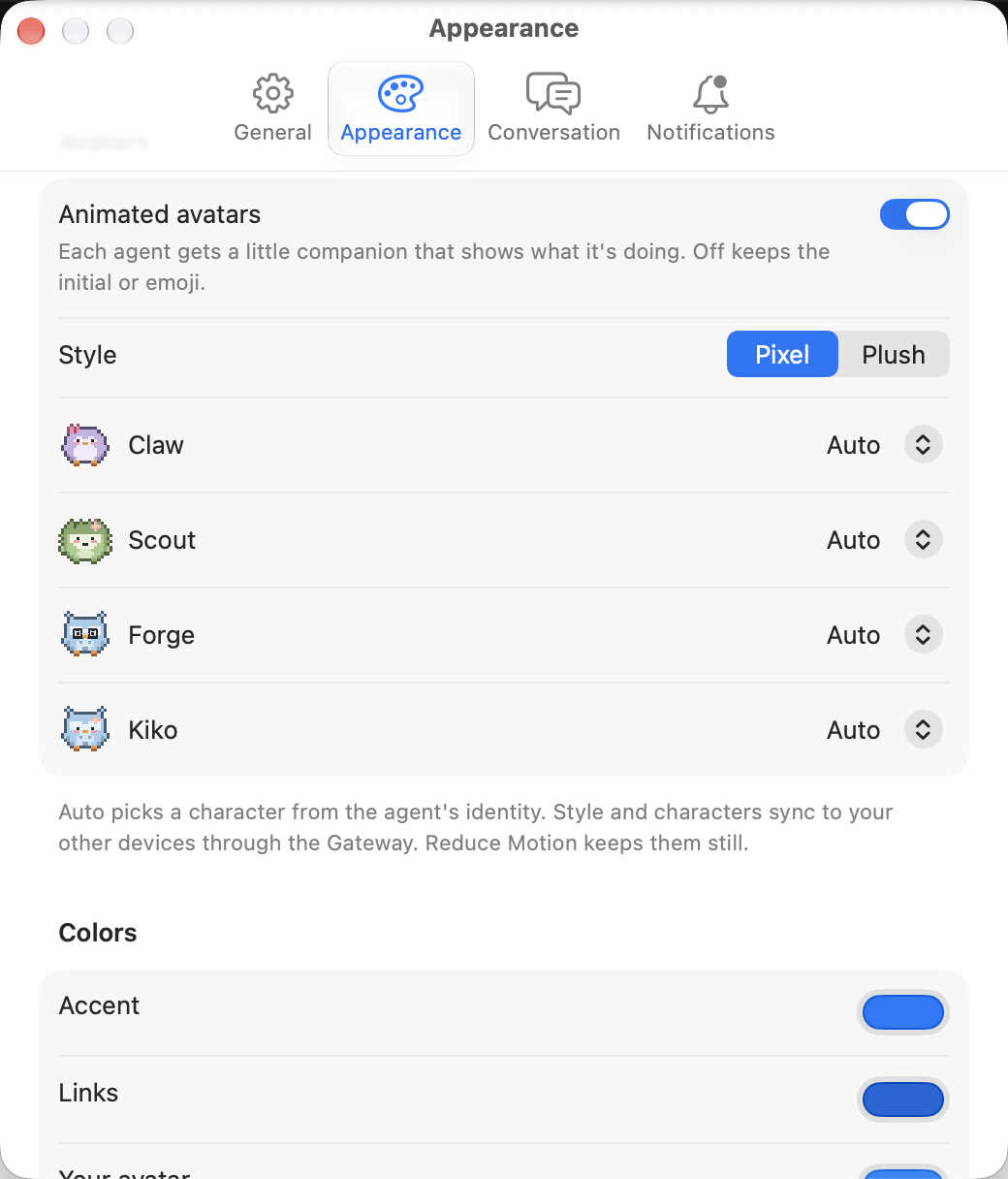
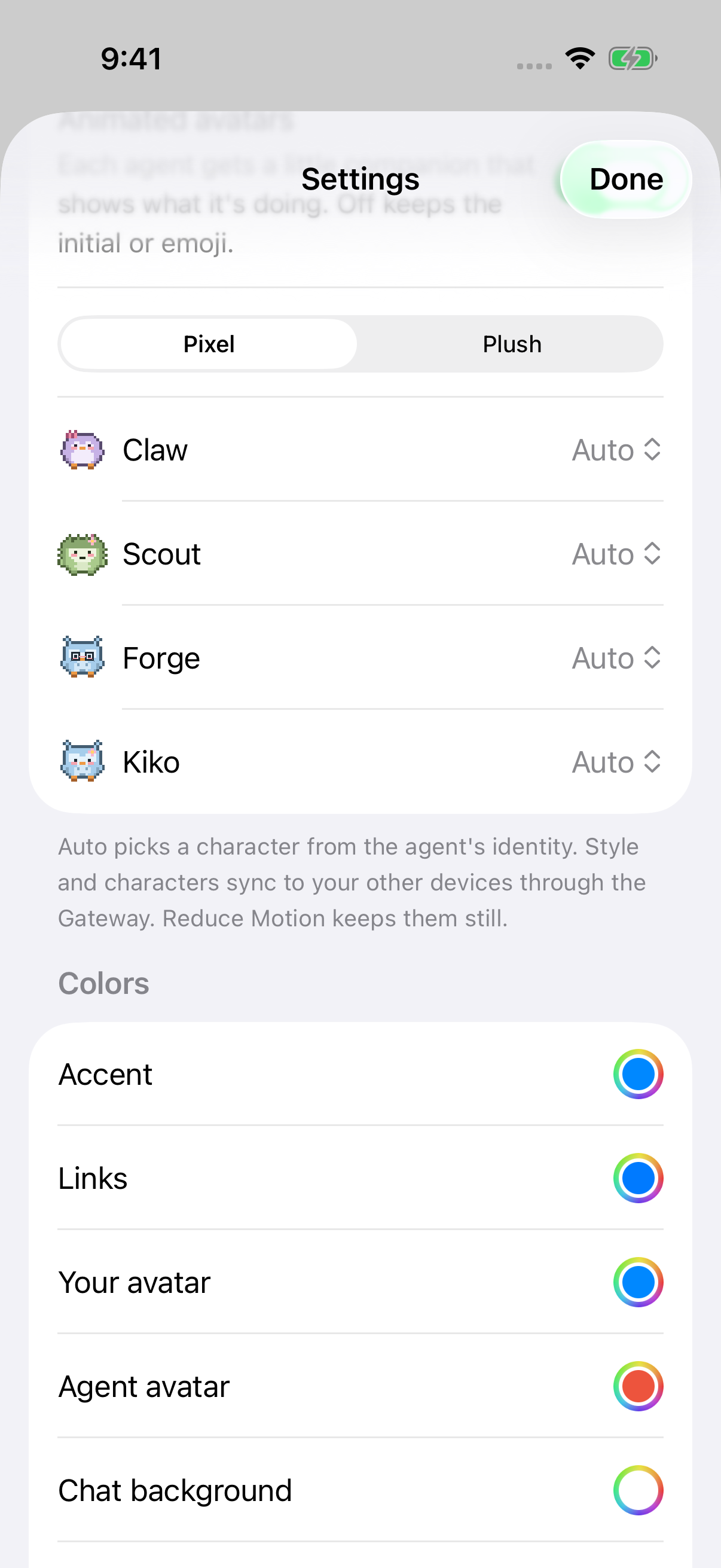
Section titled “Settings”Open Settings → Appearance:
- Animated avatars turns the pets on or off. It’s on by default. When it’s off, Pincer shows the usual agent avatar, and idle unread chats in the sidebar show a plain dot instead of the pet.
- Style picks Pixel (crisp pixel art) or Plush (soft and rounded).
- Avatars lists each Gateway’s agents separately, with the Gateway name, a still preview of the pet, and a character picker. A choice changes only that Gateway’s copy of the agent, even when another Gateway uses the same agent ID. Auto uses the pet picked from the agent’s identity when Pincer first saw it, so it doesn’t change when you rename the agent. Or pick any creature.
- On iOS, Chat header avatar chooses Small or Large for the centered compact chat header. Small is the default. This choice stays on the device and also applies to initials or emoji when animated avatars are off. Sidebar and message avatars keep their existing sizes.
The agent’s own page in Gateway Settings → Agents & Models has a Pet section with a larger preview and the same picker (Auto plus every creature). It changes the same Gateway-specific choice shown in app Settings and only appears while Animated avatars is on.
Style, character choices and each agent’s remembered identity sync to your other devices through the Gateway, so an agent looks the same on your Mac and iPhone. Animated avatars is set separately on each device. See Synced preferences.
Whenever the agent isn’t idle, a soft ring and glow in your theme’s accent color appear behind the pet, and the tool badge uses the same accent. The creature’s own colors stay the same in every theme. See Appearance.
macOS
iOS
Motion and battery
Section titled “Motion and battery”- With Reduce Motion turned on in your system’s accessibility settings, each state shows a still pose instead of animating. A working chat’s sidebar avatar stays still and shows a small activity dot.
- In a chat, only the header’s pet animates, and only while it’s visible and Pincer is in the foreground. It redraws only when its pose changes, at no more than about 10 frames a second, and when idle it just blinks now and then.
VoiceOver
Section titled “VoiceOver”VoiceOver reads the agent’s name and what it’s doing, for example “Nova is running a tool: exec” or “Nova is waiting for your approval”. It also announces when the agent starts waiting for an approval or runs into a problem.
 Pincer · MIT License
Pincer is an independent client and isn’t affiliated with the OpenClaw project.