File edit diffs
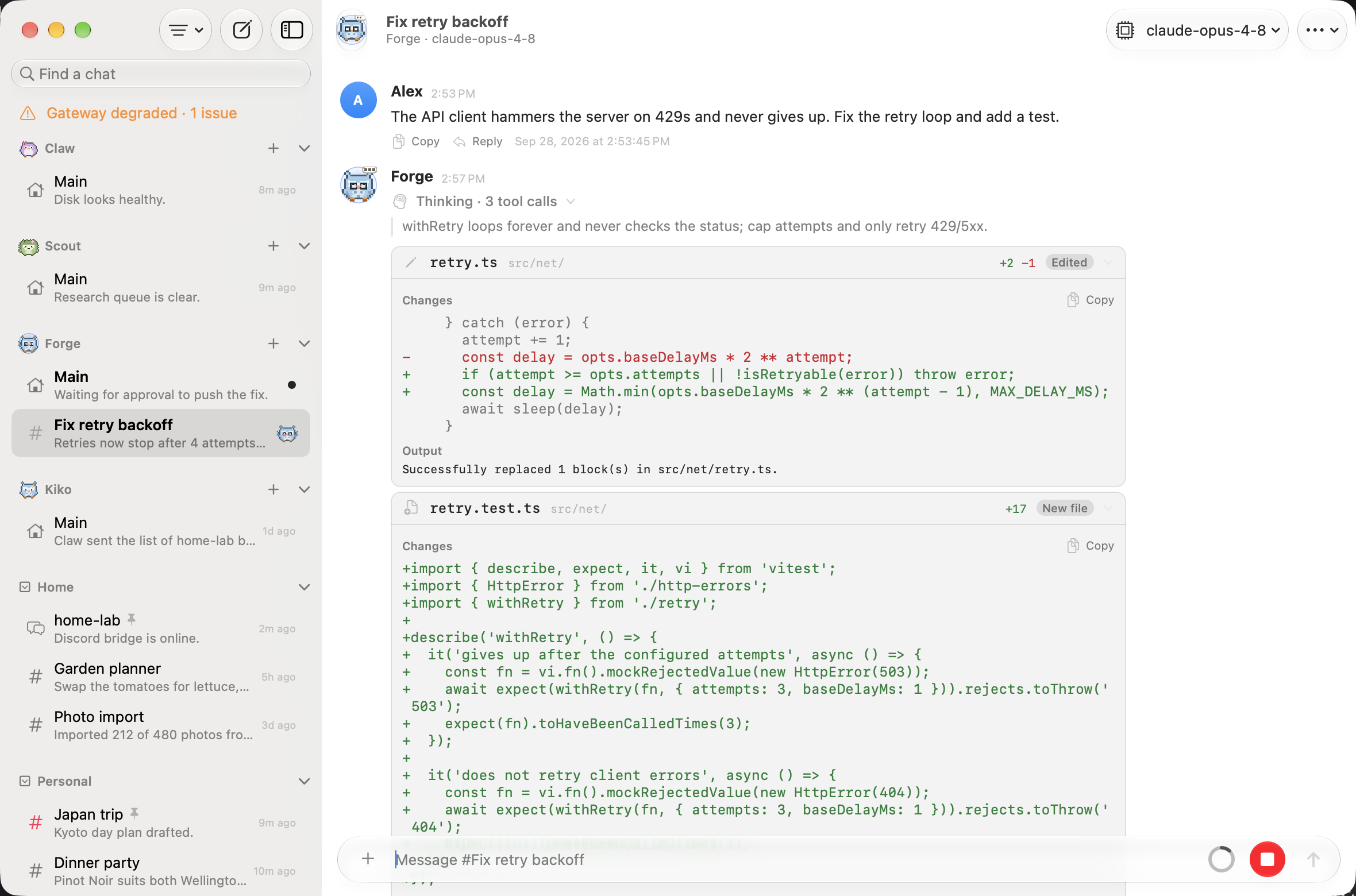
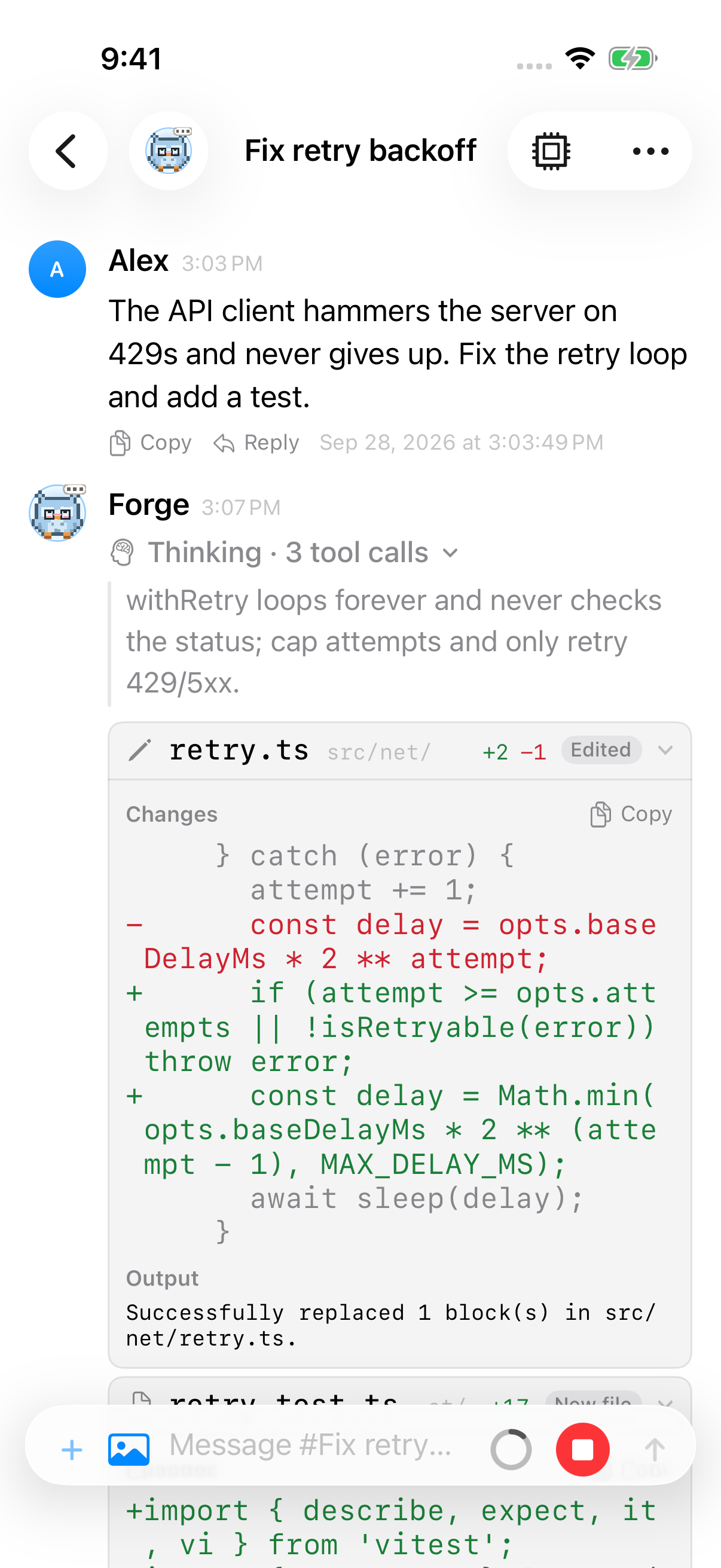
When an agent changes a file, its tool card shows the change as a diff instead of the tool’s raw JSON arguments. You see which file changed, how many lines were added and removed, and the lines themselves.
macOS
iOS
Which tools get a diff
Section titled “Which tools get a diff”Pincer recognizes the OpenClaw Gateway’s file tools and the usual aliases:
| Tool | Names | What the card shows |
|---|---|---|
| Edit | edit, edit_file, multiedit, multi_edit, notebook_edit |
The replaced text as removed lines and the new text as added lines, with a few lines of context. An edit with several replacements gets one hunk for each. |
| Write | write, write_file, create_file |
The whole file as added lines, labelled New file, or Written when the gateway reports that it replaced an existing file. |
| Patch | apply_patch, patch |
Every file in the patch, in order, each with its own header. Files that were added, deleted or moved are labelled. |
| Text editor | str_replace_editor, str_replace_based_edit_tool |
create shows as a write, and str_replace or insert as an edit. |
The file path can come from path, file_path or filePath, and the edit text from oldText/newText or old_string/new_string. When the gateway sends back its own diff with the result, Pincer shows that one, since it reflects what was written to disk.
Reading a diff
Section titled “Reading a diff”- The header shows the file name, with its folder dimmed after it, then the green +added and red −removed line counts and a badge: Edited, New file, Written (an existing file overwritten), Writing (while a write is still running), Inserted, Moved, Deleted or Patch. On macOS, hover over the header to see the full path. A patch that touches several files shows how many, for example 4 files, with the totals across all of them.
- In narrow headers, the file name truncates before the addition/removal summary. The counts stay together; if there is not enough room for the complete summary, VoiceOver still announces both counts.
- When Pincer can only count part of a change (a diff cut short by the limits below), the count is a minimum and ends in
+, like −12+, and VoiceOver says “at least 12 removed”. An overwritten file shows only its added lines, since the old contents aren’t in the call. - A single-file patch with a header-only deletion uses its Deleted badge and filename without repeating 1 file deleted. In a multi-file patch, header-only deletes can show N files deleted beside the generic Patch badge. When the patch lists removed lines, the usual −N appears. VoiceOver announces the single-file deletion with its action and filename.
- Added lines are green and start with
+. Removed lines are red and start with-. Unchanged lines are dimmed, and⋯marks a gap between hunks. The+and-signs are always there, so you don’t need to tell the colours apart. - The text is monospaced, follows your text size (Dynamic Type on iOS and iPadOS), and works in light and dark mode, with darker greens and reds in light mode so they stay readable.
- VoiceOver reads the header as, for example, “Edited Config.swift, 3 added, 1 removed”.
Long diffs
Section titled “Long diffs”File-edit cards open by default. When a diff has more than 20 lines, only the first 12 show. Choose Show all N lines to see the rest, and Show fewer lines to cut it short again. Once it’s shown in full, the whole diff is part of the card, however long it is: nothing scrolls inside the card, so the transcript simply scrolls past it. This is especially handy on iPhone and iPad, where there’s no scroll-inside-a-scroll to get stuck in.
Very large changes are shortened so the transcript stays responsive. Pincer compares up to 600 changed lines on each side of an edit, reads up to 120,000 characters and 8 replacements per call, shows the first 80 lines of a written file, and shows at most 400 diff lines per card. The last row, Diff truncated, says how many lines were left out when Pincer knows.
Copying
Section titled “Copying”Copy, next to the diff, copies the change as a unified diff (--- a/…, +++ b/…, then the hunks), which you can paste into a review or a message. A write copies the file’s full contents, including any lines past the preview. A patch too big to read in full copies the whole patch as the agent sent it.
Finding text in a diff
Section titled “Finding text in a diff”With Include Tool Output turned on in Find in Chat, Find searches the diff’s lines, as the card shows them. While there are matches in a card, its whole diff is shown, so a match is never hidden behind Show all.
While the tool runs, and when it fails
Section titled “While the tool runs, and when it fails”- While the agent is still sending the arguments, the card shows them raw, like any other tool, and switches to the diff as soon as they can be read.
- If the tool call fails, the card shows the arguments and the error like any other tool, because the change may never have been made. When the gateway sends back a diff of what it actually wrote, Pincer shows that diff with a Failed badge.
- If Pincer can’t read the arguments as a file change (an unknown shape, or a malformed patch), the card shows the raw arguments, the same as any other tool.
For every other tool, see Tool calls.
VoiceOver
Section titled “VoiceOver”The card’s header is a button that reads what changed and whether it’s expanded, for example “Edited foo.swift, 3 added, 1 removed, collapsed”. Copy diff (or Copy file contents for a new file) says “Copied” when you use it, and Show all N lines / Show fewer lines are labelled buttons. See Accessibility.
Chats cached by earlier versions
Section titled “Chats cached by earlier versions”Chats that Pincer cached before it showed file diffs don’t have the gateway’s result details, so Pincer can’t tell whether a write created its file or replaced one. After updating, those writes are labelled Written, never New file, and show only the added lines, the same as any overwrite. Edits and patches in those chats show a diff worked out from the arguments. The upgrade happens once, on your device, without downloading the chats again. To get the gateway’s own diffs for those chats, clear the cache under Settings → General → Storage (see Local cache), and they reload from the gateway.
Try it in the demo
Section titled “Try it in the demo”In the demo, open Coder → Fix retry backoff and set Thinking Steps → All in the chat’s ⋯ menu. The agent fixes a retry bug with an edit, a new-file write and a patch that updates, moves, adds and deletes files, all simulated.
With the mock gateway, send a message containing patch or diff to watch an edit stream in live.
 Pincer · MIT License
Pincer is an independent client and isn’t affiliated with the OpenClaw project.